Buy vs. Build: Kubernetes Cost Monitoring for Startups

Rob Fletcher
Co-Founder

If you run any real workload on Kubernetes, you are already aware that Kubernetes was built to keep applications running, not to tell you what they cost. The bill and the cluster speak two different languages, and translating between them is its own project.
Let's make it easy for you. Do you point a couple of engineers at building your own Kubernetes cost monitoring, using the free open-source pieces already floating around the CNCF ecosystem? Or do you pay for a tool that does it for you?
This blog walks through both paths with real numbers, a real startup example, and much more.
Why Your Kubernetes Bill Doesn't Tell You Where The Money Went?#
Start with a fact that trips up almost every team new to this problem: your cloud provider doesn't bill you for Kubernetes. It bills you for the virtual machines underneath it.
Amazon EKS, for example, charges a flat control-plane fee (about ten cents an hour) and then bills you for the EC2 instances your nodes run on, same as if you'd never touched Kubernetes at all, as DevZero's own EKS pricing breakdown lays out.
Kubernetes then packs dozens of unrelated workloads, owned by different teams, onto that same handful of machines. Your invoice shows a single line item for a $1,000 server. It says nothing about which of the fifty pods running on it actually earned that spend.
Matt Ray, who spent years as the community lead behind Kubecost and later OpenCost, put it plainly on the Open Observability Talks podcast: a managed Kubernetes bill from a cloud provider is essentially "EC2 with a management fee." The provider's console will tell you a namespace exists. It has no idea what a namespace costs. That gap between "here's your bill" and "here's who spent it" is the entire reason Kubernetes cost monitoring exists as its own category of tooling, separate from AWS Cost Explorer or Azure Cost Management.
This is also why the complaint shows up so often in public. Threads like the one on r/devops titled "K8S monitoring costs are exploding at my startup" aren't rare.
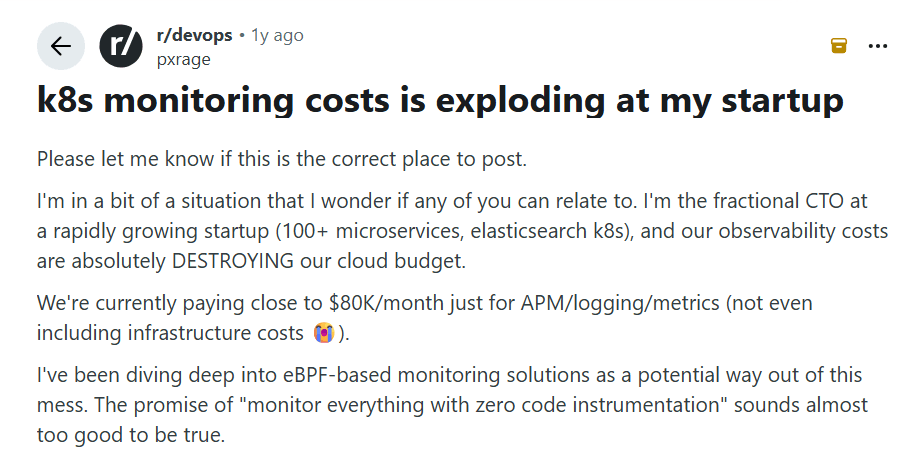
They're a recognizable genre at this point, alongside the near-identical pattern people describe with observability bills more broadly, where teams routinely discover their real spend runs two to three times higher than they budgeted for once logs, custom metrics, and cross-team usage compound over a few months.
Why Is The Average Cluster Bleeding Money Before You Even Open a Dashboard#
Here's the part that makes this worse than a visibility problem. Even once you can see the numbers, most of what you'll find is waste, not growth.
Datadog's State of Cloud Costs research found that 83 percent of container costs stem from idle resources: 54 percent from oversized clusters running more nodes than needed, and the remaining 29 percent from workloads requesting more CPU and memory than they use.
Separately, teams comparing Kubecost and OpenCost put typical pod overprovisioning at two to five times the actual need. Kubernetes' own documentation on managing resources for containers explains why: the scheduler places pods based on what you request, not what you use, so a service asking for two CPU cores gets billed for two cores whether it touches one or all of them.
Why does this keep happening?
Because the incentives point the wrong way. An engineer who under-requests resources risks a page at night when their service gets throttled or killed.
An engineer who over-requests by double just quietly wastes money that shows up weeks later in a finance report most engineers never read.
As Christian Dussol, an engineering manager who has led Kubernetes cost work at a financial firm, told Cloud Native Now, pods requesting three times the resources they actually need are common, and Kubernetes itself isn't to blame. It only allocates what you tell it to.
For a well-funded startup, this shows up as a specific, painful pattern: paying for peak capacity around the clock to protect against traffic spikes that only happen occasionally. That's exactly what one HR tech startup ran into before it fixed the problem, and we'll walk through what that actually looked like a little further down.
Three Ways Startups Try To Solve This, And Why Most Stall Out?#
Once a team notices the problem, there are usually three moves to make.
The first is leaning more heavily on native cloud tools, such as AWS Cost Explorer or the Azure and Google equivalents. These are fine for total spend by service. They know nothing about your namespaces, deployments, or teams because Kubernetes hides all of that from the billing layer.
This path answers "how much did we spend on EC2" and completely fails to answer "which team's staging cluster is costing us $4,000 a month."
The second is building on OpenCost, the free, CNCF-hosted cost allocation engine that Kubecost donated to the foundation in 2022.
This is the "build" path, and it deserves a real look, because it's genuinely free and genuinely capable at the allocation layer.
The third is buying a commercial platform, ranging from Kubecost's paid tier to newer entrants built around automated action rather than dashboards.
This is the "buy" path, and the tools inside it vary a lot more than most comparison lists let on.
Let's take the build path first, honestly, because it's the one founders most often underestimate.
What It Actually Costs to Build Your Own Kubernetes Cost Monitoring#
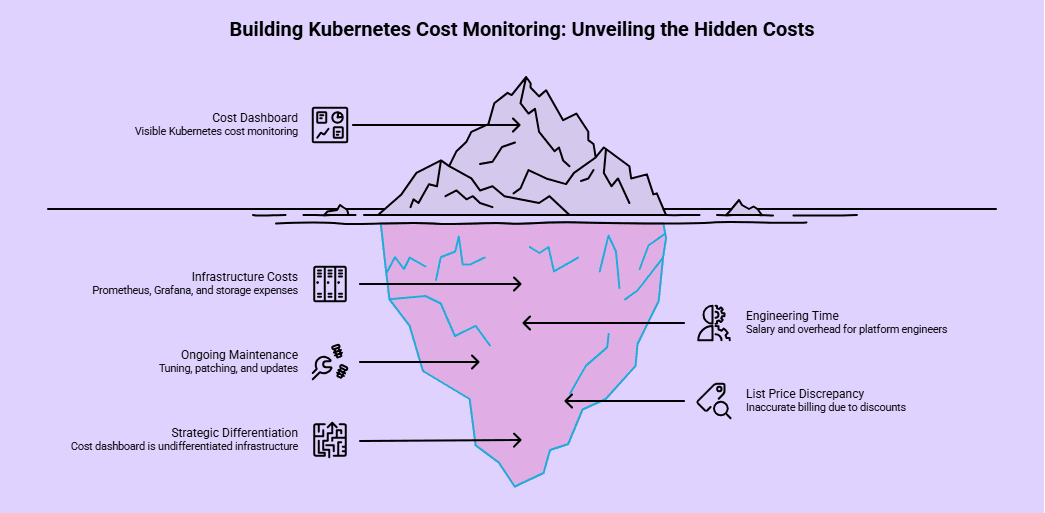
OpenCost itself costs nothing to download. It's Apache-licensed, vendor-neutral, and it does one job well: it maps your cloud provider's list-price billing data against your actual Kubernetes usage, broken down by pod, namespace, label, and cluster.
If your team already lives in Prometheus and Grafana, it fits naturally into that stack.
But "free to download" and "free to run" are different sentences. To get OpenCost working, you need a Prometheus deployment with at least seven to fourteen days of retention, persistent volume storage for OpenCost's own data, read-only cloud provider credentials to pull pricing data, and a Grafana setup if you want anything beyond raw API responses.
None of that is exotic if you already run Prometheus at scale.
If you don't, you're now standing up and maintaining an entire monitoring stack just to see your cluster bill clearly.
There's also a limitation worth knowing before you commit engineering time to it.
OpenCost calculates against your cloud provider's list price, not your actual reconciled invoice with reserved-instance discounts, savings plans, or negotiated rates applied. Those adjustments can land days or weeks after the spend happens.
OpenCost will get your direction right. It won't match the number Finance sees on the actual bill, and closing that gap is a separate, harder engineering project.
Then there's the part that takes time. A platform or DevOps engineer capable of standing up and maintaining this stack now earns a median base salary in the $130,000 to $172,000 range in the US as of early 2026, according to recent Glassdoor and industry salary data.
Add the standard load for benefits and overhead, and one engineer spending even three or four weeks on the initial build is already a five-figure cost before you've optimized a single workload.
That's before the recurring tax kicks in.
Someone has to keep tuning retention windows and patching dashboards, and someone has to touch the Helm chart every time Kubernetes ships one of its three annual releases. And unlike a subscription, you can't cancel that cost. It's now a permanent, if partial, part of someone's job.
That leads to the question worth asking honestly before you start: is Kubernetes cost dashboarding something that actually differentiates your startup, or is it undifferentiated infrastructure work that any competent vendor already does better? In a roundtable on the build-versus-buy dilemma in software, a group of practitioners landed on a simple filter: apply engineering energy to whatever separates your business from everyone else, and buy the parts that don't. A cost dashboard has never made a customer choose your product over a competitor's.
If you decide to build anyway, do it with your eyes open. Budget real calendar time instead of calling it a "sprint," and put one clear owner on it instead of a rotating cast of whoever has a free afternoon. Then set a hard checkpoint at 90 days and compare what you built against what a $0 tool already gives you out of the box.
That last part matters more than it sounds like, because in this category, "free to buy" is also an option, not just "free to build."
What You Get, And Don't Get, When You Buy#
Here's the distinction that changes your decision: this market splits into two genuinely different categories, and most tools cover only one.
Visibility tools#
Tell you where the money went. Kubecost, OpenCost, CloudZero, and Finout all live here.
They're excellent at allocation, at showback and chargeback reporting, at answering "which namespace spent what." Kubecost's paid Enterprise tier runs around $8 per node per month, so a 50-node cluster comes to about $4,800 per year and a 100-node cluster to about $9,600, before you factor in multiple clusters or environments.
Optimization tools#
Go a step further and actually change something without a human manually applying every recommendation, resizing a pod's requests one week and consolidating idle nodes the next. CAST AI, ScaleOps, and Sedai sit in this camp, and they matter because of a limitation both Kubecost and OpenCost readily admit: neither one auto-optimizes.
They surface waste. Somebody on your team still has to act on every single recommendation, cluster by cluster, week after week.
That gap is where DevZero sits, and it's worth naming plainly rather than dancing around it.
DevZero's cost monitoring product gives you the same multi-cluster, multi-cloud visibility as the tools above, with costs broken down by cluster, node, and workload across AWS, GCP, Azure, and on-prem, from one dashboard instead of stitched-together spreadsheets.
But the free Start Free plan includes unlimited clusters, full cost monitoring, network monitoring, and cost attribution by team, with no card required, which removes the usual "we can't justify a subscription to find out if we even have a problem" objection entirely.
And when you're ready to act on what you find, DevZero's optimization layer applies live rightsizing with no pod restarts, using forecasting to set requests instead of relying on a static guess an engineer made six months ago.
The company reports a 30 to 60 percent average reduction in compute bill within two weeks of installing the read-only operator, which takes under 45 seconds to deploy.
If you're going to buy, don't sign anything until you've pressure-tested a few claims.
Ask whether the tool shows real per-team cost or just cluster totals dressed up nicely.
Ask whether it can act on what it finds, or whether it just hands your engineers a to-do list they'll deprioritize the same week it arrives.
And be wary of any vendor that won't let you pilot on your own cluster's real data before you commit to a contract. A demo built on someone else's sample dashboard tells you almost nothing about your own waste.
So Which One Should Your Startup Actually Pick?#
There isn't a universal answer, but there is a fast way to get to yours.
If you're running a handful of small clusters, your team already knows Prometheus cold, and you genuinely have spare engineering capacity this quarter, OpenCost is a legitimate, zero-cost starting point. It buys you real allocation data while you decide if the problem is big enough to warrant more.
If your cluster count, node count, or cloud bill is growing fast enough that "we'll get to it eventually" keeps sliding another sprint, the calculus flips.
At that growth rate, the cost of not knowing compounds faster than the cost of a tool.
DataBahn, an AI data infrastructure startup, ran into this as it expanded past a single cloud, moving onto Azure with OCI and GCP planned next. Instead of relearning cost management from scratch for each new provider, DataBahn's Head of Architecture standardized on one monitoring approach it could carry into every cloud it touched, which the company points to as a real factor behind the up to 75 percent AWS cost reduction it later reported.
Our honest opinion on this: if you can't say, right now, which three workloads in your cluster cost the most per month, you don't have a build-versus-buy decision to make yet.
You have a visibility gap to close first, and closing it costs nothing if you start with a free tier instead of a free weekend of your best engineer's time.
How One Startup Went From Flying Blind To a 60 Percent Cut In 30 Days#
Personality Pool is a startup that screens job candidates using AI, analyzing video and behavioral data for employers in hospitality, retail, and healthcare. Their traffic is spiky by nature.
When a customer posts new openings, applicants flood in, spiking demand 10 to 20 times normal levels almost instantly.
To avoid dropping requests during those windows, the engineering team provisioned for peak capacity around the clock.
"Honestly, it felt like we were flying blind," said Lauren Glass Mullins, the company's CEO, in DevZero's case study. Engineers provisioned conservatively because getting it wrong meant an outage with their name on it, but nobody could quantify how much that safety margin actually cost or where to start trimming it.
The team installed DevZero's read-only operator on their EKS cluster.
Under a minute, no changes to production, no risk.
Within hours, they had utilization data they'd never had before, and the baseline was rough: 15 percent cluster utilization, meaning Personality Pool was paying for roughly nine times the compute it was actually using.
Five days in, they started applying the recommendations. Daily spend dropped 30 percent within 24 hours. By day 30, total infrastructure spend was down 60 percent, with no changes to the application itself and no performance loss.
What Mullins highlights as the bigger win is that infrastructure costs now scale predictably with usage instead of jumping around based on provisioning guesses made under pressure, which means her team spends its time building the product instead of guessing at resource requirements.
If your traffic pattern looks anything like that, spiky, unpredictable, currently handled by throwing more capacity at it, DevZero's free assessment will show you your own utilization number in about 24 hours, with zero commitment either way.
What Most Startups Have Gone Through This Won't Tell You#
Two main things gatekeepers consistently hide, and both matter more to a startup than to an enterprise.
First, nobody separates the cost of finding out from the cost of fixing it. A tool that costs $8 per node per month sounds cheap until you remember it only tells you what's wrong.
Somebody still has to spend hours every week turning those recommendations into pull requests, across every cluster, indefinitely. That labor cost rarely appears in a pricing table, but it's real, and it's the reason a lower sticker price doesn't automatically mean a lower total cost.
Second, almost nobody talks about the FinOps concept practitioners privately call "shameback." It's showback with teeth: showing a team they spent $130 an hour running a workload that needed a fraction of that, not to punish anyone, but because visibility alone changes behavior.
Also, something worth remembering as a cautionary tale: teams have discovered unauthorized cryptocurrency mining running on forgotten dev instances purely because a cost anomaly alert flagged spend that didn't match any known workload.
Cost monitoring isn't only a finance exercise. It's occasionally the only thing that catches something a security tool would have missed entirely.
For a startup specifically, there's a third gap worth naming: a ten-person engineering team doesn't need role-based access control across forty clusters. It needs an answer in a week, not a quarter, and it needs that answer without burning its scarcest resource, senior engineering time, just standing up the infrastructure to get one.
Conclusion#
Building your own Kubernetes cost monitoring is possible, and OpenCost is a genuinely solid foundation if your team has the Prometheus expertise and spare capacity to run it well. But for most startups, the real cost is the senior engineering time that building it consumes, month after month, on a problem that a $0 tool can easily answer.
Start with the free assessment. If your team already knows precisely where every dollar of your Kubernetes spend goes and what to do about it, you don't need this article.
If you don't, DevZero's free tier will show you your own numbers, unlimited clusters, no card, and installation in under a minute, before you decide whether building your own version is still worth it.
Frequently asked questions#
Is it cheaper to build Kubernetes cost monitoring with OpenCost than to buy a tool?#
The software is free either way at the entry level. What isn't free is the engineering time to deploy Prometheus, tune retention, provision storage, connect cloud billing credentials, build Grafana dashboards, and keep all of it working through every Kubernetes release. For most startups, that time costs more over a year than a paid tool's subscription, and it doesn't include the fact that OpenCost still leaves the actual optimization work to your team.
What's the real difference between Kubecost, OpenCost, and DevZero?#
OpenCost is the free, open-source allocation engine. Kubecost wraps that engine in dashboards, governance, and paid support, but like OpenCost, it stops at showing you the waste. DevZero starts at the same visibility layer, free, across unlimited clusters, and adds automated rightsizing on top, so the waste it finds gets fixed without someone manually applying every recommendation.
How much does Kubernetes waste typically cost a startup?#
Industry-wide, Datadog's research ties 83 percent of container spend to idle resources across the organizations it studied. Individual results vary a lot by workload shape, but Personality Pool's own baseline, paying for roughly nine times the compute it used, is a realistic picture of what an unmonitored cluster looks like at the startup stage.
Do I need a FinOps team to start monitoring Kubernetes costs?#
No. FinOps is a useful discipline once you're at scale, but at the startup stage, one engineer installing a read-only monitoring tool and reviewing a dashboard weekly covers most of the value. The formal chargeback and governance processes can wait until you have more than a handful of teams sharing clusters.
Is open-source Kubernetes cost monitoring good enough for a small team?#
Yes, if your team already runs Prometheus comfortably and your cluster count is small. OpenCost gives you real allocation data at zero licensing cost. The tradeoff is that you own every part of the operational burden, and you'll eventually want a way to act on what it finds, which OpenCost doesn't do on its own.

Rob Fletcher
Co-Founder


